
A Minimum Fundraising Pledge allows your Peer-to-Peer fundraisers to commit to meeting their minimum fundraising goal.
If they don't reach their target by a specified date, they're automatically charged for the difference, meaning a guarantee that they'll reach their goal and no more awkward conversations for you at events.
How it works
For your fundraisers
- During registration or in their Fundraising Portal, participants can opt-in to a Minimum Fundraising Pledge
- They continue fundraising normally throughout your campaign
- On the processing date you set, the system calculates if they've met the minimum goal
- If there's a shortfall, their saved payment method is automatically charged for the balance
- Participants can cancel their commitment at any time before the processing date
For you
You get guaranteed minimum fundraising commitments from participants who opt-in, offering multiple benefits:
- Predictable revenue and less risk - Know your minimum fundraising floor before your campaign even ends, and greater certainty that participants not meeting their goals
- Increased participant accountability - Participants take their fundraising more seriously when they have financial commitment
- Higher average fundraising - The commitment motivates participants to reach their goals through peer fundraising first
- Simplified event logistics - Reduce no-shows, last-minute dropouts and tough conversations with participants who can't meet minimums
- Flexibility - Make the commitment optional or mandatory in order to participate
Setting Up Minimum Fundraising Commitment
Minimum Fundraising Commitments are available for set up in Peer-to-Peer (Pledge & Multi-Pledge) campaigns and enabled on a per campaign basis. The feature is off by default.
To enable, follow these steps in your Peer-to-Peer campaign:
- Go to the Participant and DIY Settings area
- Find the "Enable Minimum Participant Fundraising Pledge" section towards the bottom
- Check the box turn on the feature
- Determine the amount that fundraisers must hit:
- Minimum Fundraising Goal defined in the event; or
- their Personal Goal
Minimum Fundraising Goal that each fundraiser must reached is based on most current Minimum Fundraising Goal of the Registration Type/Item that the fundraiser signed up as. If a minimum goal is not defined at the Registration Item level, then we'll calculate against the Minimum Fundraising Goal at the Campaign/Event level.
- Set your processing date (when shortfalls will be charged). This can be before the event, on event day, or afterwards to give fundraisers time to meet their goal.
- Customize the opt-in text that participants will see during registration and in their portal
You can make changes to the Date, Goal or Opt-In text at any time – including after processing. If changes are made post hoc, the latest logic will be applied to the all fundraisers in the campaign for processing. This means that fundraisers may be charged twice, depending on when changes are made.
Participant Opt-In
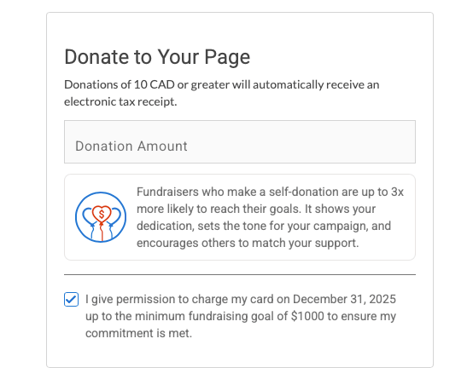
Participants can choose to opt-in during:- Initial registration - A checkbox appears on the Payment page registration flow
- Their Fundraising Portal - Under the Self-Donation area
When opting in, participants provide their card information. Card details are tokenized securely and tokens are stored using bank-level security. The process is exactly the same as how monthly donor cards are saved and processed - except that fundraisers are committing to a single one-time payment. Indeed, constituent and card data is of utmost importance.
If the ability for participants to register multiple participants is turned on, only the primary fundraiser will opt-in to the fundraising commitment and enter their card details. Additional participants will be registered without the commitment.
Cancelling a commitment
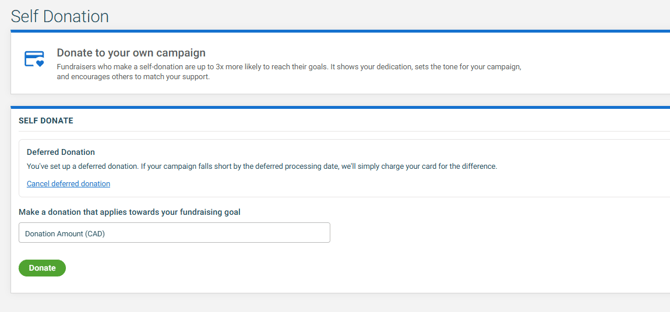
In advance of the processing date and if fundraising commitment is optional in the event, participants can choose to opt-out and/or make a single one-time donation to cover their balance from the Self-Donation tab of their Fundraising Portal.
Monitoring Adoption
You can track which participants have committed to a Minimum Fundraising Commitment in a couple ways:
In raisin Analytics
In raisin Analytics, the Participants Report, any Participant Chart or any Report/Chart that uses the Participants Dataset, there is a field called "Contact IsDeferredPledge". This field can be added to the chart/report using Personalization or applied as a filter.
When the value is:
- True = Participant opted in
- False = Participant did not opt in
In a User Profile
When viewing a User Profile, look for "Scheduled Transaction" indicator on participant records.
Charging the Balance
On the processing date you configured, at roughly 12:00 AM ET, the system will automatically:
- Calculate shortfalls - Reviews each opted-in participant's total funds raised (Online, Offline Confirmed and Offline Unconfirmed) against the minimum goal established in DIY & Fundraising Settings
- Process charges - Using the saved payment method, the system will attempt to process any shortfall amount. If successful, the gift becomes a self-donation.
- Issue a tax receipt to the participant in their name
- Update participant records so that the successful self-donation immediately reflects in:
- Their fundraising thermometer (now showing they've met their goal)
- Their Donation History (appears as a self-donation)
- Their Activity Feed
The entire process is entirely automated, requiring no manual intervention from your team.
Reprocessing
If the initial attempt is declined, we'll try to re-process two more times. Changes to the user can be made within that timeframe.
Best Practices
Depending on your event, minimum fundraising goals may be new to your fundraisers. As such, we recommend a few best practices so that there aren't surprises come event day, and so that it doesn't deter potential registrants:
- Clearly communicate the processing date to participants when promoting commitment opt-in, and tie to event activities or incentives
- Set a processing date for shortly after your event or campaign end date so that fundraisers have time to reach their goal. Raising money is hard!
- Include Minimum Fundraising Commitment information in your participant welcome emails and materials
- Frame it positively as a way for participants to demonstrate their commitment to your cause, and tie to incentives or event day activations
- Send reminder emails to participants a week before the processing date, encouraging them to reach their goals through peer fundraising
- If the idea is brand new, consider offering this as an option for participants who want to guarantee their impact