
1.0 How to cancel all future gifts
The steps below outline how to cancel a recurring donation schedule on raisin only.
Steps:
- Navigate to the Donor's Profile (General Setup > Manage Users > Donor Profile OR Event > Manage Users > Donor Profile)
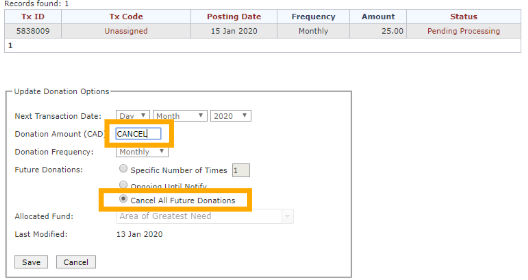
- Select Update Donation Options
- Click Cancel All Future Donations
- In the Donation Amount field, type CANCEL
- Click Save to confirm your changes.
IMPORTANT
Cancelling on raisin does not stop the recurring payment schedule with your gateway. You may need to separately cancel the recurrence directly through your payment gateway to prevent future processing.Once cancelled on raisin, the donation schedule cannot be restored. The donor will need to make a new donation to resume giving.
We do not advise leaving scheduled gifts with a status of 'Pending Processing' if they are indeed meant to be cancelled but have an expired credit card; depending on your gateway settings, a payment may still be successful even if the credit card on file has expired.